Saturday, September 26, 2009
Tonight's Sunset
Saturday, September 19, 2009
Lesson 2 ~ Apertures
If you're wondering......YES, the second photo is supposed to be blurry, except for the marbles that I was focusing on! Can you tell which one I was focusing on? I'll give you a hint....it's the one that is sharp and in focus! :)
Lesson 2: Apertures
Shutter Speed ~ 1/250
Aperture ~ f/22.0
ISO ~ 800
Focal Length ~ 50.0 mm
***click on the picture to enlarge!
Open Aperture
Shutter Speed ~ 1/4000
Aperture ~ f/1.8
ISO ~ 100
Focal Length ~ 50.0 mm
***Here is the comment from my teacher...
candice*stringham
[Sep 30, 2009 at 08:11 PM]
I love the use of the mirror! Coupled with the open aperture, the photo has the feel that the marbles are floating. Great job obstacles and all!
deje34
[Oct 02, 2009 at 04:08 AM]
Thank you Candice.....I look so forward to your critique, to see if I actually got it right. This assignment was a fun challenge for me and I feel like I was able to get a little creative with it, which by the way, it doesn't come natural for me to think outside the box, but I'm workin' on it! Thank you, for your comment....I am so happy right now!!!
Thursday, September 10, 2009
Oh Shoot! Beginning Digital Photography Class
Anyway, I took lots of photos of my dog Sunny running on the beach and some of my daughter Kasey jumping in the backyard for me, but these were the two I chose to submit to my class gallery.
Lesson 1: Shutter Speeds
SHARP
Fast Shutter Speed ~ 1/3200
ISO ~ 800
F-Stop ~ 2.0
Focal Length ~ 50.0 mm
BLUR
Slow Shutter Speed ~ 1/15
ISO ~ 800
F-Stop ~ 22.0
Focal Length ~ 50.0 mm
These photos have not been edited.....we're not allowed to in our class, so that way our instructor can critique our work, straight out of the camera.
My photos were taken with the...
Canon Rebel xsi
Canon EF 50 mm Lens
Tiffen Filter UV Protector
***Yay, I'm so excited! I got it right! My instructor critiqued my first assignment and so I decided to add her comment, so I can keep a record of how I am doing.
This is what she wrote:
candice*stringham [Sep 16, 2009 at 12:53 AM]
Debra- GREAT job! You did an incredible job handholding at 1/15 second. The rocks are tack sharp yet the water is silky smooth, whereas in the other photo the water droplets are frozen. Shooting in dappled sunlight is one of the trickiest for your camera to meter correctly. You increased the ISO which works here because of the shade and the dark grey rocks, and the end result is a perfect exposure. I'm so glad you had fun with this lesson!
deje34
[Sep 16, 2009 at 05:30 PM]
Yay....I got it right! Candice, thank you for your reply! I look forward to all of your critiques, so that I can learn and improve. Woo hoo, this is so fun!!!
Friday, September 4, 2009
I WON, I WON....Not Just 1, but 2 Giveways!
Leah from over at Live Life Simply, sent this beautiful necklace that she handmade! Didn't she do a fabulous job? I just love it! I actually left her a comment on her blog, stating that I was already picturing it with the perfect outfit, not knowing that I would actually win it. Isn't that funny? As soon as I opened it today, I went straight into my closet, to see how many outfits it would go with. LOL Thank you, Leah for drawing my name....I can't wait to wear it! You should think about selling these, that is, if you don't already.
Wednesday, September 2, 2009
Sunday, August 30, 2009
This Made Me Laugh!
***(Please remember to pause my music player before watching the video)!
Wednesday, August 26, 2009
Monday, August 10, 2009
Which One Is The Best?
#1
#4Saturday, August 8, 2009
My Blog Has Been Morphing...
I finally did settle with this one though......it's not my favorite color, but at least it's a warm color. Those of you who know me well, know how I love warm colors! I am pleased with how well, the colors in my header pictures, go with it. I just wish I could figure out how to change the background color on my header from white to a dark color. Ugh! So much still to learn in Photoshop Elements.
Thursday, August 6, 2009
Honey, I'm Lost Without You!
Seriously though, we are coming up on our 25th wedding anniversary on the 18th and when you've spent that much time together, it feels like a part of you is missing, when they're gone. I just love spending time with him, but don't you worry, I am quite capable of using my time alone, very unwisely.
I decided to stay in my pajamas all day today.......play on the computer with my photoshop program.......print out some pictures.......talk on the phone for an hour with a friend who is hurting.......lay in my bed snuggled up in my down comforter for a little time of rest (since I haven't slept a wink in days).......replaced the water in the fish tank after accidentally splattering soap bubbles in it........talk to my friend Michelle for a minute to discuss something with Photoshop.......catch up on some blog reading.......watch the So You Think You Can Dance finale......eat more than I should have........load the dishwasher and then write this blog post. WHEW! IT'S BEEN A VERY HARD DAY! I think I will finish it off with a long hot bath, write in my prayer journal and then go to bed. I REALLY MUST LEARN TO TAKE IT EASY, DON'T YA THINK?
Collages Are Cool!


I'm finally finished with my last project.......WOO HOO! Now maybe I can take a breath before starting the next class. I ran into a couple of problems with this project, which means it took me way longer to do it, than it should have. It's always something really simple too and then I just feel stupid, when I figure it out! I guess maybe I should have thought about taking a basic beginners class first......nawww! LOL
Saturday, August 1, 2009
I'm Lovin' This Dragonfly!
I finally finished Lesson 10 that I skipped and I'm lovin' this dragonfly! I was suppose to use two textures in this project, but I took them out because they made it hard to see the detail of the dragonfly. I may go back later and play with some different textures to see if I can find one that looks good. Anyway, I'm just glad I'm finished with this one and now I only have one more to go. Woo hoo!
Friday, July 31, 2009
Almost Finished...
Lesson 11: Selective/Spot Recoloring
This is one of my favorite hummingbird pics, but I prefer the whole pic in color, so I think I will do this technique with a pic I took of a yellow rose bud. I know it will look better! This was the easiest lesson so far.....seriously, I couldn't believe how easy it was!
Ok, I didn't think about changing the background to a different color until it was too late, so I'm stuck with white, unless I redo it. To make it look better I added a border around the pictures, as well as the whole storyboard. I resized it for the web and now it looks so small that you can't see the pictures very well.......but you get the idea, I guess. This would look really cool framed and on the wall! (actually, I just remembered, you can click on the picture to see a closeup!)Thursday, July 23, 2009
Check Out These Online Photoshop Classes...
Another class that I am interested in taking is the Photo editing: Good-to-Great Workflow. Check out all of the other classes that are available too because there are some great ones to choose from.
Once you register for the class, you will have access to the forum, where you can ask questions if you need help with a lesson. You will also be able to upload your pictures to the gallery where you can receive feedback on your work.
Oh and one more thing.....check out the Free tutorials!
This is an awesome website and Jessica is an awesome teacher, so I just had to share! (I'd like to say a big thank you to my niece, Maryanne for sharing it with me)
Wednesday, July 15, 2009
More Photoshop Fun!
Before
This is an old photo of mother with her catch of the day!
After
Lesson 8: Type
Before Timber jumping off a hill!
After
Lesson 9: Edge Burn
Before Tucker picking up sticks!
After
I think I should have made the edges a little bit darker, but I still think this looks good! I'm really enjoying these lessons, but I can't wait until the two weeks are up, so I can just play with the different techniques.
Friday, July 10, 2009
Oh My Goodness...I'm Hooked On Photoshop!
I love this picture! I just finished today's lesson and the techniques were so cool! This was my favorite lesson so far.Ok, this one is boring, but I just wanted to see what flowers would look like and now I know! I can't wait to see what we will be doing tomorrow!!!
Photoshop Progress

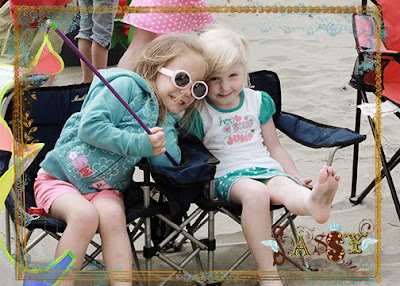
Lesson 1: PNG Frames and Word Art (Ryah and Kaylie)

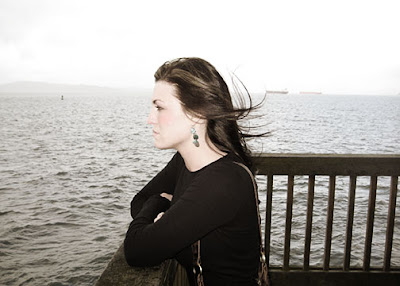
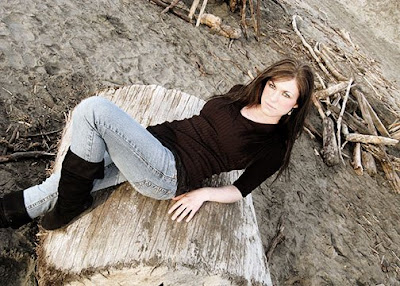
Lesson 3: Create a Vintage, Hand Tinted Look (This is my daughter Kasey)
(Kasey)
I had a hard time with this because I kept feeling like I was taking too much color out of the photo and making her skin too white, so I did it over 3 or 4 times. (Kasey)
In this one I didn't take quite as much color out, so she doesn't look as pale, but I think I tinted her cheeks a little too dark. Ugh!

I used the techniques from lesson 3 for this adorable pic of (Owen Hillard)! I took this pic of him while we were out at the beach with our church family.
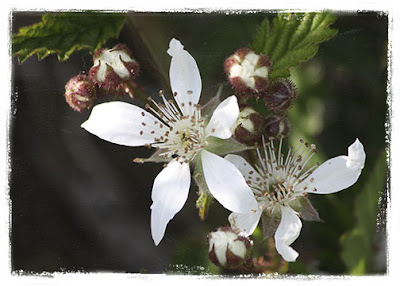
Lesson 4: Clipping Masks