Wednesday, October 27, 2010

Show Your Skills Linkup!

My friend Amanda of Everyday Elements, is hosting this Show Your Skills linkup and this week, we are using her barbed wire picture with cow's hair tangled up in it! I've included her original image, so you can see the before and after.
If any of you would like to join in, there's still time and hey, if you want to learn how to edit your own pictures Amanda is a great teacher! Check out her website and all of her free video tutorials, plus free actions, textures and editing tips etc.  She also offers very affordable live online workshops, if you're interested and trust me, you will learn sooo much! 

This is my edit and here is a very quick run down of what I did....
Levels adjustment  50  1.12  222 > Hue/Sat adjustment> Saturation +22> Photo Filter> Blue 77%> added some overlays and a texture at different opacities, until I got the colors I wanted. I used Soft Light blending mode on all of them except one...on that one, I used the Saturation blending mode!  I darkened the barb underneath the wire just a smidge and I sharpened the middle of the barb just a smidge also. As you can see, I like color....it may not be appealing to some, but I am drawn to warm colors!  :)
This is Amanda's original sooc image!  I love this shot and I thoroughly enjoyed playing with it in photoshop elements!  Thanks Amanda, this was fun! :)


Wednesday, October 6, 2010

Love Your Shot Link Up!

This is my first submission to the Love Your Shot Link Up over at Love That Shot!  I took this photo of Hannah Burk, in a recent photo shoot, for her senior pictures and I am in love with her gorgeous brown eyes and beautiful face!

Canon EOS Rebel XSi ~ 50 mm f/1.8 lens ~ Aperture f/2.8 ~ Shutter Speed 1/40 sec ~ ISO ~ 200 ~ Focal Lenth 50.0 mm  (This is my final edit and the one she will use as one of her senior pics.)  Scroll to the bottom of this post to see the original (sooc) shot and work your way up to see the Post Processing steps.
In this final edit I went back and darkened her lips just a tad and then I used the lasso magnetic tool to remove some of the texture from the background while leaving the color, then added a slight vignette  and I love the end result! 


Next I added a texture on overlay blend mode and lowered the opacity to 60% and used the magnetic lasso tool to erase the texture off of the skin, while leaving the tint (color). I then added the same texture, but this time I erased the texture off of the skin entirely and then I added one more texture on softlight blend mode, just to brighten up her eyes and skin a bit more.  

I did a clean edit using Amanda, of Everyday Elements Deep Clean 1 & 2 actions, which I adore. I removed blemishes, lightened up all of the shadows on the one side of her face, evened up her skin tone,  softened her hair just a bit etc. I then ran Amanda's Eye Tricks action and then her Newberry action and tweaked all the layers, plus I changed the color of her clothes by using the "bring out the blues" layer in Newberry. I used a white brush 63 % layer opacity and then just brushed over her clothes and raised the layer opacity to suit.

This is the original straight out of the camera shot and as you can see, it's a bit dark because the sun was setting and there wasn't much light left in the sky, but I was having too much fun shooting to stop! LOL

Friday, September 17, 2010

Post Processing on Hannah Burk's Photo!

Thought I'd share my Post Processing on Hannah's photo!  Hannah is such a sweetheart and a dear friend to our family and I appreciate her letting me practice my photography and photoshop skills on her!

This is (sooc) straight out of the camera!  I forgot to change my white balance, so it was on auto. Ugh!   As you can see her skintone, just isn't right....it's a little too pink and the bright sun, made her skin too light on the left side of her face.  Then, the right side of her face is in the shadow, so that needs to be fixed also.

I started out in Adobe Camera Raw and did some tweaking there, but I still wasn't happy with the color of her skintone. Next I opened it up in PSE 7 and did a clean edit with Amanda's Deep Clean 1 and 2 actions (where I removed blemishes, evened out skintone, smoothed skin, burned her lips to make them a little darker etc.) and then I fixed her skintone with Amanda's Stix action. (As you can see, I also got rid of the shadow on the right side of her face and lightened up the shadow on her arm a little bit too!)

Ok, so now I softened her hair and then added the Rustic 7 texture, from Shadow House Creations, set to Normal -layer opacity 90% and erased it off of her skin and hair.  Then I added Patti Brown's Apparition Glow overlay, set to Screen -layer opacity 45%.  I then added Patti's Fantasy II Glow overlay over entire image, set to Normal -layer opacity 11%. Then I ran Amanda's Vignette Options action and only used the Multiply layer to darken the corners a bit. (Do you see the dark spot on her shirt up on her shoulder?  It's from the texture, so I had to fix that!)

I erased the Apparition Glow overlay off of the background in this image and then to fix the spot on the shoulder, I added a layer mask and chose a color next to the spot and brushed it over the shirt, with a soft black brush!

Ok, this was my final edit and in this one, I increased the opacity layer to 100% on the Rustic 7 texture and I like the end result!  I still haven't decided whether this one is my favorite or the image right before it. I was going for a very soft look and I think I accomplished it!  I just hope Hannah likes it too!  So there you have it....I listed the main steps to the post processing, but of course, I didn't list exactly everything I did to the image....just what I could remember, besides it would take way too long, to list every detail. LOL

Tuesday, September 14, 2010

Andy & Dave's Road Trip Adventure!

Andy and Dave about to leave on their Harley adventure. These brother's need some serious bonding time!

Don't they look like "biker" dudes? Well, Dave really IS a biker dude, but Andy's just now becoming one!  LOL

Rev 'em up boys! Vrrroom, Vrrroom!

There goes Davey....oh, it's probably not cool to call a Harley rider, "Davey," is it? I meant, "Hey, there goes Dave, that cool biker dude!" hahaha

Annnd......they're off!  (I owe a big thank you to Jane, my sister-in-law, for taking these pics!)
Beautiful Scenery!

Dave chillin' on his Harley! Isn't he cool? This was taken at Craters of the Moon National Monument.

This is in Idaho!

I love this picture of biker Dave!

Before Sunrise in Arco, Idaho! Isn't this beautiful? His iphone takes pretty good pics!

This is highway 22 and Andy said, there was about 200 miles of this! LOL

My honey is home! Oh, how I missed him, but I'm so thrilled he had a great time with Dave. They will have to do this again, for sure!  In fact, from what I understand, next year they will be taking a trip to Alaska!  Oh....what fun they will have! 

Thursday, September 2, 2010

Attention Shoplifters....Oh, I mean Photo-lifters!

I guess I will be creating a watermark for my photos soon, because someone swiped one of my photos off of my blog, somewhere around the 21st of July.  When I logged on to my blog sometime after that, it said a photo had been removed and I was shocked to find that my background was completely gone, just solid white! Fortunately, I was able to reinstall my background and nothing else was messed up, at least I don't think so, the rest appears to be ok.
 
Anyway, that's never happened before, so I wasn't sure what to do, but I think there's a way to track it, isn't there?  Does anyone know if you can track it, to see who took the photo?

Here's the thing....If any of you would like one of my photos, just leave me a comment and ask me if you can have a copy, especially if you're one of my friends or maybe you happen to be in the picture.....I would be more than happy to email it to you!  

I have so many pictures, that I haven't added on my blog for this very reason, until I get a watermark on them, so hopefully I will get to that soon!

Ok, well that about sums it up, so NO MORE PHOTO LIFTING....PLEASE!  Haven't y'all seen those signs in the stores that say, "Shoplifters Will Be Prosecuted!"  Maybe we need to make a sign for "Photo-lifters!"  LOL 

Thursday, August 26, 2010

Before & After Shots...Plus...Who I'm Learning My Photoshop Elements Skills From...

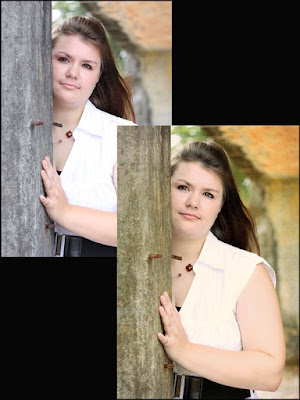
Here are some BEFORE and AFTER shots of Hannah (my friend's daughter), so y'all can see, just what you can do in Photoshop Elements 7.  These photos are just some of Hannah's senior pictures, that I've done so far, but I'm working on some more at the moment. (***NOTE: click on the images to enlarge!)

I love this one!  I need to mention that I used Amanda's actions on all of these pics......I LOVE her actions!!!  I also changed the color of the background with overlays in this one!

The original in this one is underexposed!  It was taken in a dark spiral staircase and we tried to get her somewhat close to the top toward the light, but no worries.....I fixed it in Photoshop! Now I just need to add a vignette and try some overlays to change the background a little.  I actually did this one in some brown tones with one of Amanda's actions and it's really awesome and I also did it in black & white, with another one of her actions.
I still have one more thing to fix on this one and then I will be happy with it, but I thought I'd share it anyway.  I need to smooth out her skin on the right side of her face, just a tad bit more, but this is definately a favorite of mine!  I used overlays, to change the colors in the background and I must say, that I LOVE Amanda's Vignette Options action also!


I really love this one, even with those rusty nail thingys, sticking out of the cement wall!  LOL  Oh and I used Amanda's Deep Clean 1 & 2 action on all of these pics.....I can't live without them, plus I also used a texture on this one.

I gave a shout out, for my friend/teacher Amanda recently on my facebook and so I decided to do the same here on my blog. I want you all to know who I'm learning all of my photoshop skills from.....I wanna make sure and give credit, where credit is due! Lol Fortunately for me, I happened upon her blog one day at Photography Haven which then led me to her Everyday Elements online workshops and tutorials where I signed up for her All About Actions online workshop.


I've always wanted to learn how to load actions into my PSE and learn how to use them and Amanda's workshop taught me just that! I joined her Everyday Elements Facebook Fan page  immediately and her flickr group (for workshop attendees only) where she gives a wealth of information and help and even critiques our editing to help us learn more and more about editing in PSE. If any of you out there are interested in learning how to use Photoshop Elements or actions, I encourage you to check out Amanda's workshops and tutorials, I highly recommend them. I actually won her online Advanced Intermediate workshop for free, through one of her giveaways in her flickr group.....lucky me! 

Anyway, to sum this up.....Amanda is very easy to learn from and is a very humble, generous, knowledgeable and an extremely helpful teacher. I just met her online, just before the first workshop I took on June 1st and now I feel as if I've always known her. I feel as though we are kindred spirits and we haven't even met in person, but sometimes you just know, when you've met a person of good character! I really hope and pray I can meet her in person someday, so I can personally thank her for all that she is teaching me and hug her neck, as we used to say, when I lived in the south. She really is a sweetheart, y'all.

Wednesday, August 18, 2010

26 Blissful Years Together!

Today we celebrated our 26th Anniversary, so I thought I'd share some wedding pics with y'all! 

I'd also like to share something my husband wrote on Unifyer yesterday and I'll also share my response to him.  (Just in case you don't know....Unifyer is a communication tool used by churches and it's awesome.)   ***CAUTION.....YOU MAY THINK THIS IS A LITTLE SAPPY!  LOL

So here is what Andy wrote:

Things I Know About Marriage After 26 Years!

1. Marriage gets better with Age!

2. Love only becomes real through time, trials, and togetherness
.
3. To care for ONE person for so many years is indescribable. You HAVE to experience it.

4. Looking back shows you how far you've come.

5. 26 years is not very long, and I long for more.

6. Life After Kids is Awesome. (I loved having Kids, but they are not the highlight of our marriage)


I know that its a day early but I love my wife now more than I ever could imagine. I know that I have said that throughout the years, but it keeps growing to unimaginable depths. I never realized that love is so unstoppable and it makes me long for what our love will be in 26 more!


How can you have a marriage so full of Love?


1. Forgive one another daily.


2. Desire one another Hourly.


3. Prefer one another every minute. (put the other first)


4. Think of one another every second.


and learn how to do this through the ONE who taught it to us.
Jesus Christ.

Here was my response to what he wrote:

I'm in tears after reading this and I'm almost speechless because words can't even express my love for my husband!  Last night as I laid in my bed not able to sleep, I just watched my Andy, my honey, my best friend, sleep so sound and so calm and it made me smile, as I looked at his face and thought about how much I love him!

He means more to me than life itself and living life with him just gets better every day.  Our love just deepens more and more by the minute and the longing in my heart for him never goes away, in fact it just gets stronger and stronger!  I still light up when he walks through the door and I still want to spend every waking moment with him.

Being married for 26 years is a long time, but to me, it's not long enough!  I long for many more years to spend with my honey and he is so right......marriage does get better with age!  If it's this good now after 26 years......I can't even imagine how blissful it will be in the years to come!

I love you babe and thank you for loving me and for still making my heart go pitter patter, even after 26 years of marriage!  You're the best husband and friend I could have ever dreamed of having!  We were made for each other and I thank God for giving me you!  Happy Anniversary my love!

Wednesday, July 21, 2010

Surprise From Old Friends!

What a great surprise when I answered the phone recently and Wayne said, "How do I get to your house?"  I was like....what?  Are you here in town? Lol  As it turned out, they were driving through town on their way to Alaska, where they are being stationed in the Coast Guard once again.  We were so thrilled to be able to spend some time with them, after not seeing them for several years and let me tell you, they haven't changed a bit!  Oh and Wayne is still a hoot, just like he always was.....some things never change. haha  Anyway, Wayne and Cora if you see this.....thanks for the nice surprise visit!!!  We love y'all!


And now on another note.....I will be MIA for a little bit because I'm having back surgery in 5 1/2 hours and I don't know how long it will be before I'm up and able to get on my computer.  I know what some of you are thinking, "You've already been MIA, so what's new?"  Well, that's true I haven't been blogging a whole lot because I've been laid up off and on with my back for several months now and especially since February.  I think that's when my vertebrae actually broke off and is sitting on my tailbone.  Anyway, I won't bore y'all with anymore of that, I just wanted to let you know why I've been absent on here and why it will be awhile til I'm back on, unless my husband can figure out a way to rig my computer up beside my bed. LOL  Hope to be back on soon!

Wednesday, July 7, 2010

Fireworks 7/04/10

Capturing good shots of fireworks is not easy, but I gave it a good try. I had to cheat a little on a few of these and lighten them just a bit in photoshop because they were a little dark.  Maybe I'll do better next year! Lol  These were taken with my Canon Rebel XSi ~ 55-200mm lens ~ manual mode ~ shutter speed set to BULB ~ Aperture f/16 ~ ISO 100

Wednesday, June 23, 2010

Pink Sky After Sunset!

I love it when the sky turns pink after the sun has set!  It was getting dark very quickly, so I had to hurry and get some shots, while there was still a little light.  If only I had noticed it sooner!  I took these from my back deck on May 27, 2010. 
The wind was blowing so a couple of the branches are a little blurry!

The dark clouds add a little drama!

I just love the pink sky in this one!

The clouds are covering Saddle Mountain in this one.


                                                      I really love the clouds!

Please hop on over to SKYWATCH FRIDAY to see more beautiful skies around the world!

Monday, June 21, 2010

Creepy Crawly Things!

I'm having so much fun with textures and overlays from Patti Brown's collections over at Kaleidoscope.  Check out her blog here!  I love how textures can add an artistic look to a creepy crawly image!

This poor caterpillar was blown off this leaf, by a huge gust of wind, right after I took this shot.  It was hangin' on for dear life, as I was snapping pics in between gusts, but our storms are pretty powerful, so it finally lost the battle and fell about 4 feet to the ground.  (Photo taken Sept. 2009)

This is a little risky of this fly don't you think?  Don't worry though.....the spider didn't get him!  This was the first pic I took with my 50mm 1.8 lens the day it came in the mail!  (Photo taken 9-3-09)

I wish I would have been fast enough to get a shot of this grasshopper, when he was upside down. He was a funny little thing to watch and boy was he fast!  (Photo taken 9-3-09)

Ewww.....I don't like spiders, but I don't mind photographing them!  (Photo taken June 2010)

This grasshopper blends right in with the colors in the background doesn't he? 
(Photo taken 9-3-09)

                                                               (Photo taken 9-3-09)

LinkWithin

Related Posts with Thumbnails